

Screen privacy laws in workplaces define the legal boundaries around monitoring employee screens, collecting visual data, and handling information on company devices and premises. No single federal U.S. law governs all aspects of workplace screen privacy. Instead, compliance depends on a patchwork of federal statutes like the Electronic Communications Privacy Act (ECPA), state laws in New York, Connecticut, Delaware, and California, and international frameworks like the GDPR. For HR professionals and employees alike, understanding these rules is the first step toward protecting sensitive information in shared environments.
What are screen privacy laws workplaces explained?
Screen privacy laws in workplaces are the legal rules that govern when, how, and why employers can monitor employee screens, capture digital activity, or collect visual data from company devices. The term “screen privacy law” is not a single statute. It describes a category of overlapping regulations covering electronic monitoring, data protection, and employee privacy rights.
The ECPA sets the federal baseline in the United States. It permits employers to monitor company-owned devices for legitimate business purposes. That permission is broad, but it is not unlimited. States like NY, CT, and DE require written notice before any electronic monitoring begins. California’s CCPA and CPRA add strict transparency obligations, giving employees the right to know what data is collected and why.

The core legal concept across all these frameworks is the “reasonable expectation of privacy.” Courts consistently rule that employees retain some privacy rights at work, even on company devices, unless a clear written policy removes that expectation. That single principle drives most compliance decisions HR teams face.
What legal rights do employees and employers have regarding screen monitoring?
Employers hold broad monitoring rights under U.S. federal law, but those rights shrink quickly when state law or poor policy management enters the picture.
What employers can legally do
Under the ECPA, employers may monitor screens, emails, and digital activity on company-owned equipment when a legitimate business reason exists. Courts uphold employer monitoring when a clear technology use policy is in place and employees have acknowledged it. The key requirement is disclosure before monitoring starts, not after.
- New York, Connecticut, and Delaware require written notice to employees before electronic monitoring begins.
- California’s CCPA and CPRA require employers to disclose what personal data is collected, how it is used, and who receives it.
- Employees have the right to know what data is collected, request corrections, and ask for deletion under California privacy law and similar statutes.
- Monitoring is prohibited in spaces where employees have a reasonable expectation of privacy. States like Michigan and West Virginia criminalize hidden surveillance in restrooms, locker rooms, and similar private areas.
- Proportionality matters. Excessive data collection “just in case” is increasingly viewed as a legal liability, not a business asset.
What employees can expect
Employees working on personal devices, even during work hours, generally retain stronger privacy protections than those on company equipment. The moment a company issues a device and documents a monitoring policy, the employee’s reasonable expectation of privacy on that device drops significantly. HR teams must communicate this clearly during onboarding, not buried in a 40-page handbook.
Pro Tip: Request a copy of your company’s Acceptable Use Policy on your first week. If it does not mention monitoring, ask HR directly. Knowing the policy protects you and helps you work with appropriate caution on shared or company-owned devices.
How do international privacy regulations like GDPR affect workplace screen privacy?
The GDPR sets the strictest workplace monitoring standards in the world. Any U.S. company with employees or operations in the European Union must comply, regardless of where the company is headquartered.
GDPR requires a lawful basis, transparency, purpose limitation, and proportionality for all workplace monitoring. Employers must disclose monitoring before it starts. They must limit data collection to what is strictly necessary. Employees retain the right to access any personal data collected about them, including screenshots or screen recordings. For high-intensity monitoring tools like continuous screen capture or AI-based surveillance, companies must conduct a Data Protection Impact Assessment (DPIA) before deployment.
New Zealand’s Privacy Act 2020 follows a similar philosophy. Covert or unjustified monitoring can trigger personal grievances under employment law. Employees have the right to access recorded screen data, and continuous screen recording requires stronger justification than periodic activity logs.
The table below compares key requirements across major frameworks.
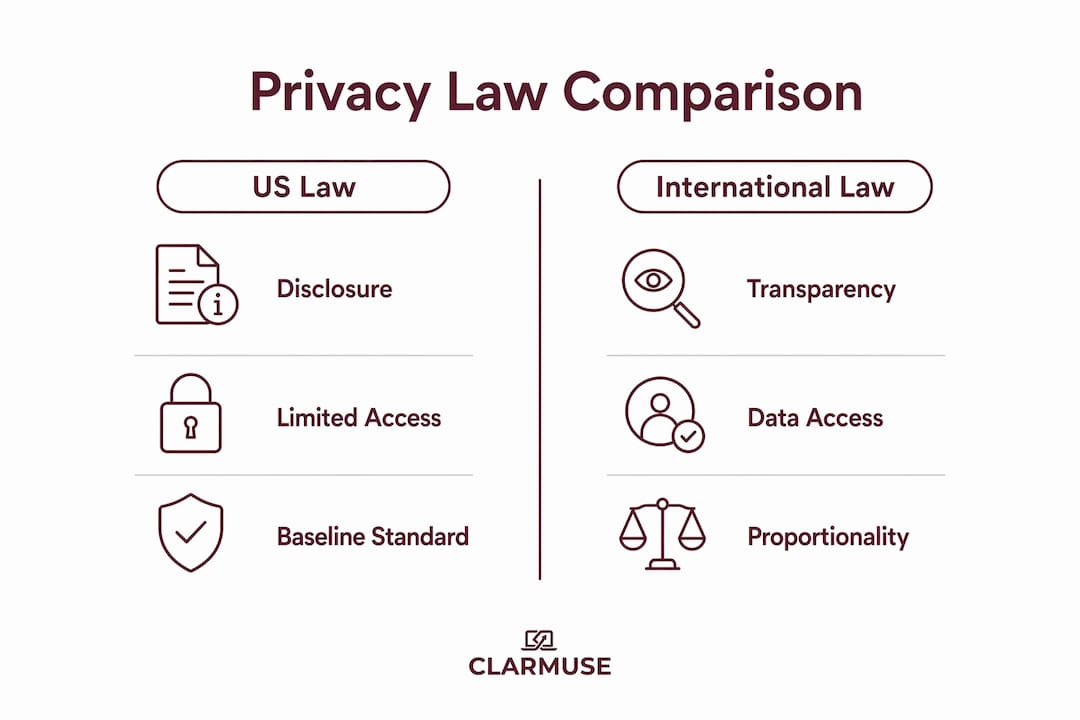
| Framework | Disclosure required | Employee data access | DPIA or equivalent | Proportionality rule |
|---|---|---|---|---|
| U.S. ECPA (federal) | Recommended | Limited | Not required | Not mandated |
| NY, CT, DE state laws | Yes, written notice | Varies by state | Not required | Not mandated |
| California CCPA/CPRA | Yes | Yes, including deletion | Not required | Implied |
| EU GDPR | Yes, before monitoring | Yes | Required for high-intensity | Mandatory |
| New Zealand Privacy Act 2020 | Yes | Yes | Recommended | Mandatory |
U.S. companies operating globally face the highest compliance burden. The GDPR standard effectively becomes the floor for any multinational employer, since meeting it generally satisfies most other frameworks as well.
What are best practices for implementing screen privacy compliance at work?
HR professionals who treat screen privacy as a legal checkbox create risk. Those who treat it as a trust-building exercise create better workplaces and face fewer claims.
- Write a clear Acceptable Use Policy. The policy must explain what is monitored, why it is monitored, how long data is retained, and who can access it. Vague language creates legal exposure.
- Obtain written acknowledgment. Have every employee sign or digitally confirm they have read the monitoring policy before monitoring begins. This single step satisfies notice requirements in NY, CT, DE, and most other states.
- Apply the least-intrusive method. The trend toward proportionality means only the least intrusive monitoring method justified by a legitimate business need is defensible. Keystroke logging is harder to justify than periodic activity summaries.
- Exclude private spaces entirely. Employers must avoid surveillance in restrooms, lactation rooms, and other sensitive areas. This is not optional. Violations carry criminal penalties in several states.
- Address emerging technology explicitly. Smart glasses and continuous screen capture require specific policy language. In sensitive sectors like healthcare, total recording bans are common. Tie any recording capability to existing confidentiality agreements.
- Audit policies regularly. Regular policy audits reduce legal exposure and keep compliance current as laws change. Schedule a review at least once per year.
Pro Tip: Distinguish between “monitoring” and “recording” in your policy language. Continuous recordings carry higher legal obligations than periodic activity logs. Using precise language in your policy reduces ambiguity and limits liability.
How can employees protect their screen privacy within legal workplace frameworks?
Employees have more control over their screen privacy than most realize, even within the boundaries of legal employer monitoring.
- Use a physical privacy screen. A privacy screen protector limits side-angle visibility, which is the most common form of visual data theft in open offices, cafés, and coworking spaces. This is a practical layer of protection that works regardless of what your employer’s monitoring policy says.
- Position your screen deliberately. Positioning your MacBook screen away from foot traffic and high-traffic sightlines reduces shoulder surfing risk significantly. In open-plan offices, this one habit prevents most accidental data exposure.
- Read your company’s monitoring policy. Most employees never read it. Knowing exactly what is monitored tells you where your privacy ends and where it begins. It also tells you whether the company has met its legal disclosure obligations.
- Request disclosure of your collected data. Under California law and GDPR, you have the right to ask what data your employer holds about you. You can also request corrections to inaccurate records. Exercise this right if you have concerns.
- Assume company devices are monitored. Employees generally have no privacy rights on company email or devices when a clear monitoring policy exists. Keep personal activity on personal devices.
- Know the signs you need more protection. If you regularly handle client data on your screen in shared spaces, you are a high-risk target for visual data exposure. Act accordingly.
Key Takeaways
Workplace screen privacy compliance requires disclosed, proportionate monitoring policies that respect employee rights under federal, state, and international law.
| Point | Details |
|---|---|
| No single U.S. federal law governs screen privacy | Compliance requires layering ECPA with applicable state laws and international frameworks like GDPR. |
| Written notice is mandatory in several states | NY, CT, and DE require written employee notification before any electronic monitoring begins. |
| GDPR sets the global compliance floor | Multinational employers who meet GDPR standards generally satisfy most other frameworks simultaneously. |
| Proportionality is the emerging standard | Only the least intrusive monitoring method justified by a real business need is legally defensible. |
| Employees retain actionable rights | Under CCPA, CPRA, and GDPR, employees can access, correct, and request deletion of collected data. |
The compliance gap most workplaces ignore
The legal complexity of workplace screen privacy is real, but the bigger problem is simpler: most companies have a monitoring policy that no one reads and practices that exceed what the policy actually authorizes. That gap is where legal exposure lives.
Monitoring is broadly allowed in the U.S., but the risk arises when actual practices exceed documented policy. A company that logs keystrokes but only disclosed email monitoring in its policy has a problem, even if keystroke logging is technically legal in that state. The policy creates the expectation. Violating the policy violates the trust.
What I find most interesting about the current moment is how EU standards are quietly reshaping U.S. practice. Proportionality and DPIAs were GDPR concepts five years ago. Now U.S. legal advisors recommend them to domestic clients as risk management tools, not legal requirements. The standard is moving upward whether U.S. law requires it or not.
The future of workplace screen privacy will be shaped by AI-based monitoring tools and remote work environments. Continuous screen capture, activity scoring, and behavioral analytics are already in use at large employers. The legal frameworks have not caught up. HR teams that build proportionate, transparent policies now will face far less disruption when the laws do catch up.
Physical screen privacy is the one layer that operates completely outside the legal debate. No policy governs what a passerby can see on your screen. That gap is real, and it is worth closing.
— Gabriel
Clarmuse magnetic privacy screens for shared workspaces
Open offices, coworking spaces, and airport lounges create constant screen exposure that no monitoring policy addresses. Clarmuse makes magnetic privacy screen protectors designed specifically for MacBook Air and MacBook Pro models, attaching cleanly without adhesives or bulk.
The filters reduce side-angle visibility so colleagues, clients, and strangers cannot read your screen from the next seat. They complement your company’s legal compliance efforts by closing the physical exposure gap that written policies cannot cover. Clarmuse offers model-specific fits for the MacBook Pro 16.2", the MacBook Air 15.3", and the MacBook Air 13.6" for M2 through M5 models. Each filter attaches and removes in seconds, making it practical for daily use without changing your setup.
FAQ
What is the ECPA and how does it apply to workplace screen monitoring?
The Electronic Communications Privacy Act (ECPA) is the primary federal U.S. law governing electronic monitoring. It permits employers to monitor company-owned devices and communications for legitimate business purposes, provided a clear policy exists.
Do employers have to tell employees they are being monitored?
In New York, Connecticut, and Delaware, written notice before electronic monitoring is legally required. In most other U.S. states, disclosure is strongly recommended but not always mandated by statute.
What rights do employees have under GDPR regarding screen data?
GDPR gives employees the right to access any personal data collected about them, including screen recordings, and to request corrections or deletion. Employers must also disclose monitoring before it begins and conduct a DPIA for high-intensity tools.
Can an employer monitor screens in break rooms or private spaces?
Monitoring in spaces where employees have a reasonable expectation of privacy, such as restrooms or locker rooms, is prohibited. Several states including Michigan and West Virginia treat hidden surveillance in these areas as a criminal offense.
How can employees protect sensitive screen data in open offices?
Using a physical privacy screen protector, positioning the laptop away from sightlines, and keeping personal activity off company devices are the most effective steps. Employees should also read their company’s monitoring policy to understand exactly what data is collected and retained.


