

Working privately on your MacBook in an airplane seat is achievable with the right combination of hardware and positioning strategy. The technical term for the core solution is visual privacy filtering, and it works by narrowing the angle at which your screen is visible to anyone not sitting directly in front of it. Magnetic privacy screens, seat orientation, and network security tools each play a distinct role. This article covers all three layers so you can work on sensitive documents, client calls, or confidential spreadsheets without worrying about the person in 14B reading over your shoulder.
How to work privately in an airplane seat with your MacBook
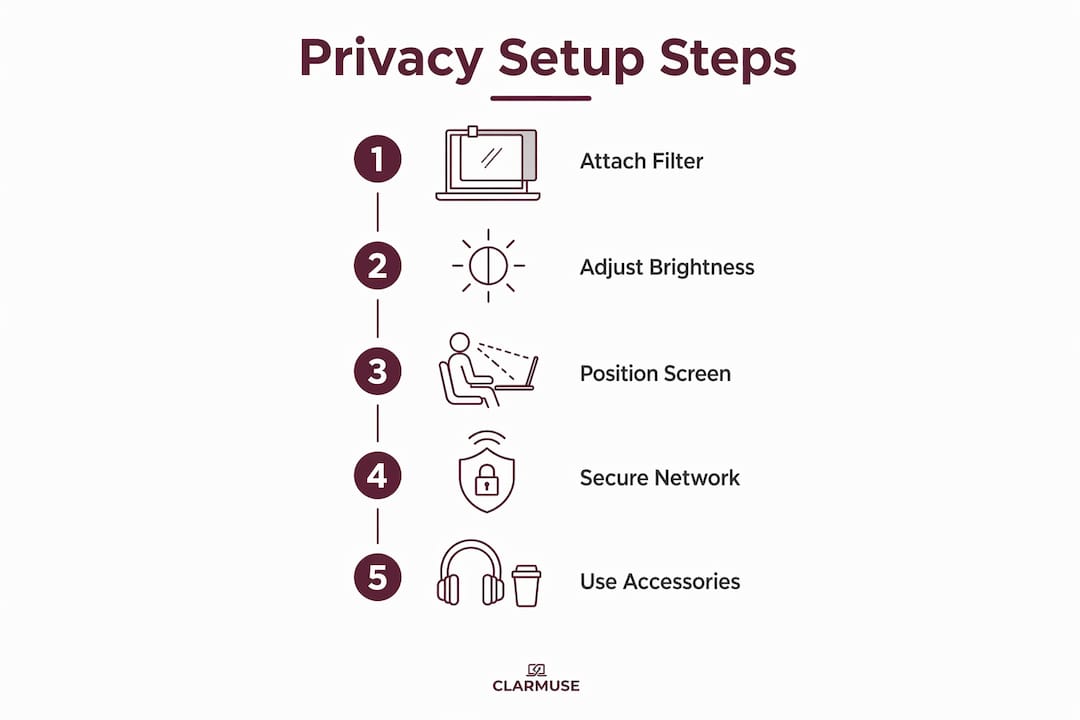
The foundation of any private airplane workspace is a magnetic privacy screen. These filters use microlouver technology to create a narrow viewing cone directly in front of the screen, while blacking out the display for anyone viewing from the side. The result is that your screen looks dark or unreadable to a neighbor at a 30 to 60 degree angle, while you see a clear, usable display from straight ahead.
Magnetic attachment is the key differentiator for travel use. Unlike adhesive privacy filters that leave residue and require careful peeling, magnetic versions snap on and off in seconds. You can remove the filter for a movie, reattach it before a work session, and pack it flat in your bag without any damage. Magnetic privacy screens typically weigh between 40 and 65 grams and cost between $49 and $79, making them a practical addition to any business travel kit.
Here is what to look for when choosing a filter for in-flight use:
- Viewing angle: A 60-degree total cone (30 degrees each side) blocks most seat-neighbor sightlines effectively
- Brightness tradeoff: Most filters reduce screen brightness by 10 to 20 percent, so bump your MacBook display up one or two notches after installing
- Blue light reduction: Many filters include a matte coating that cuts blue light, which reduces eye fatigue on long-haul flights
- Weight and thickness: Under 65 grams keeps your bag light; thinner profiles avoid tray table clearance issues
- MacBook-specific fit: Generic filters rarely align with MacBook bezels precisely, which creates gaps at the edges that defeat the purpose
Pro Tip: Set your MacBook display brightness to around 80 percent before attaching the filter. This compensates for the brightness reduction and keeps your screen comfortable without draining battery faster than necessary.
One limitation worth knowing: privacy filters do not block the view from directly behind you. A passenger leaning forward from the row behind can still see your screen. The filter addresses side angles, not rear angles. That gap is why positioning and situational awareness matter alongside the hardware.
How should you position your MacBook for maximum privacy on a plane?
Screen hardware alone does not solve the full problem. Seat position and body orientation determine how much of your screen is exposed to the cabin. A layered approach combining screen filters with physical positioning covers the angles that hardware alone cannot.
Follow these steps to set up a private workspace before your flight reaches cruising altitude:
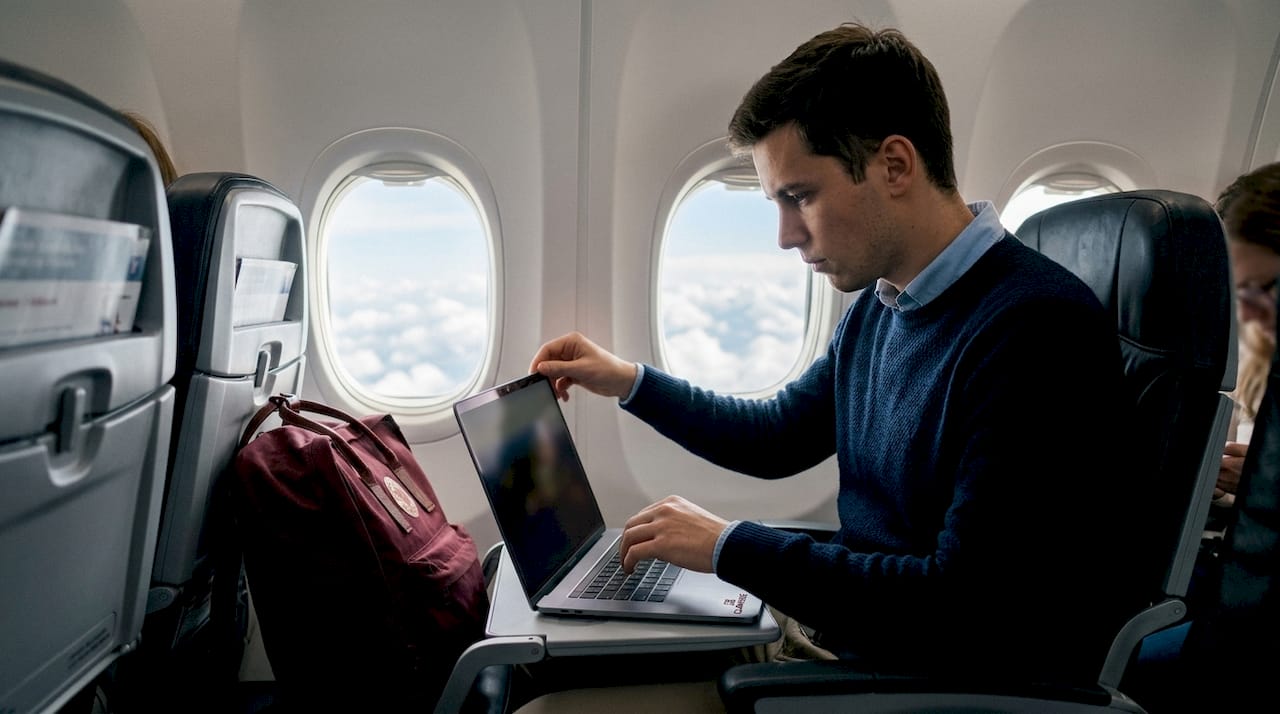
- Choose a window seat when possible. A window seat eliminates one full side of exposure. The person to your left or right is gone, and the wall gives you a natural visual barrier. On a three-seat row, the middle seat is the worst option for privacy.
- Angle your screen toward the window. Tilt the MacBook lid slightly toward the window side rather than keeping it perfectly vertical. This shifts the visible cone away from the aisle and toward the fuselage wall.
- Lower the screen angle. A screen tilted slightly back (rather than fully upright) raises the bottom of the viewing cone and makes it harder for someone in the row behind to read your display.
- Use your body as a shield. Lean slightly toward the window and position your forearm along the near edge of the tray table. This creates a physical barrier that blocks casual glances from the aisle side.
- Check your six before you start. Before opening sensitive documents, turn and look at the rows behind you. Identify whether anyone is positioned to see your screen at a rear angle. Adjust your seat recline accordingly.
Pro Tip: If you are in a middle or aisle seat, use the tray table at its lowest position and keep the MacBook screen angle below 90 degrees. A lower screen angle reduces the rear viewing window significantly, even without a privacy filter.
Tray table dimensions vary by aircraft and airline. On narrowbody aircraft like the Boeing 737 or Airbus A320, tray tables are typically around 11 by 9 inches, which fits a 13-inch MacBook Air or MacBook Pro comfortably. A 16-inch MacBook Pro may overhang the tray table edges on some aircraft, which forces a less stable and less private screen angle. Knowing your aircraft type before you fly lets you plan which MacBook to bring.
What additional tools improve privacy and productivity in-flight?
A privacy screen and smart positioning address visual exposure, but productive private work on a plane requires a few more layers. Here are the tools and settings that make a real difference:
- VPN software: A VPN like Mullvad, ProtonVPN, or ExpressVPN encrypts your connection on in-flight Wi-Fi networks. Airline Wi-Fi is a shared network, and unencrypted traffic is readable by anyone on the same connection. Treat in-flight Wi-Fi the same way you would treat airport lounge Wi-Fi: always use a VPN.
- Screen brightness management: Lower brightness reduces how far your screen glow projects into the cabin during night flights. macOS has an auto-brightness setting under System Settings that adjusts based on ambient light, but manual control gives you more precision.
- Battery and power planning: Most modern aircraft on routes over two hours offer USB-A or AC power outlets at the seat. Confirm your seat has power before the flight using SeatGuru, which maps power outlet availability by aircraft and airline. Carry a compact USB-C charger as backup.
- Noise-canceling headphones: Sony WH-1000XM5 or Apple AirPods Pro reduce cabin noise and signal to neighbors that you are focused and unavailable. This behavioral cue reduces the likelihood of interruptions that force you to expose your screen.
- Offline-first apps: Tools like Notion, Bear, or Obsidian work fully offline. Drafting documents offline removes the need for in-flight Wi-Fi entirely, which eliminates network security risk and reduces distraction.
The FAA requires that electronic devices comply with airline procedures and not interfere with aircraft systems. In practice, this means keeping your MacBook in airplane mode during takeoff and landing, and enabling Wi-Fi only after the crew announces it is permitted. Most airlines allow laptop use after reaching cruising altitude.
What are common challenges when working privately on a MacBook on a plane?
Even with the right hardware and positioning, in-flight work creates specific friction points. Here is how to handle the most common ones:
- Seat neighbor changes mid-flight. A passenger who moves from another seat can suddenly create a new sightline you did not account for. Keep your privacy filter attached throughout the flight rather than only during sensitive work sessions. Removing it for convenience and forgetting to replace it is the most common lapse.
- Brightness loss in bright cabins. On daytime flights with window shades open, the 10 to 20 percent brightness reduction from a privacy filter can make your screen harder to read. Increase brightness to compensate, or close the window shade next to your seat. Most passengers are willing to close shades during long flights.
- Limited tray table space on regional aircraft. Smaller regional jets like the Embraer E175 or Bombardier CRJ-900 have narrower tray tables that may not accommodate a 15 or 16-inch MacBook flat. In these cases, use a lap desk or fold the MacBook slightly off the tray edge, keeping the screen angle low.
- Battery drain on long flights. Privacy filters do not affect battery life directly, but higher brightness settings to compensate for filter dimming do. Enable Low Power Mode in macOS System Settings before the flight to extend battery life by 20 to 30 percent on average.
- Security screening and filter handling. TSA requires laptops to be removed from bags and placed in a separate bin. Remove the magnetic privacy filter before placing your MacBook in the bin. Magnetic filters are thin and flat, so they store easily in a laptop sleeve pocket during screening without risk of damage.
What I have learned from working privately on planes for years
After hundreds of flights working on client documents and editorial drafts, the single most consistent mistake I see is treating privacy as a one-time setup rather than an ongoing practice. You attach the filter, find a good seat angle, and then gradually let your guard down. The screen drifts upright, the filter comes off for a movie, and you forget to put it back before opening a sensitive file.
The emotional benefit of a privacy filter is real and worth naming directly. Working without one on a full flight creates a low-level anxiety that is hard to quantify but easy to feel. You find yourself minimizing windows, tilting the screen down, or just not opening certain files. A filter removes that friction. You work more freely because you are not constantly managing what might be visible.
The hardware matters, but the habit matters more. I treat the privacy filter the same way I treat the VPN: it goes on before I open anything, not after I realize I should have. Combining a MacBook-specific magnetic filter with a window seat, a low screen angle, and a VPN covers every realistic threat scenario on a commercial flight. That combination is not excessive. It is just complete.
— Gabriel
Protect your screen with Clarmuse magnetic privacy filters
Clarmuse designs magnetic privacy screens built specifically for MacBook Air and MacBook Pro models. Each filter uses microlouver technology to block side-angle views beyond 30 degrees while maintaining full clarity from the front. The magnetic attachment system means no adhesive, no residue, and no tools. You snap it on before work and remove it in seconds when you are done.
For frequent travelers, Clarmuse filters are lightweight (under 65 grams), include blue light reduction, and fit MacBook bezels precisely so there are no edge gaps. Browse the full range of MacBook Pro privacy screens or explore the best options for travelers to find the right fit for your model.
Key takeaways
Effective in-flight MacBook privacy requires a magnetic privacy filter, deliberate seat positioning, and network security tools working together as a single system.
| Point | Details |
|---|---|
| Use a magnetic privacy filter | Filters block side views beyond 30 to 60 degrees and snap on and off without adhesive or residue. |
| Choose a window seat | A window seat eliminates one full side of exposure and gives you a natural visual barrier. |
| Lower your screen angle | Tilting the screen slightly back reduces rear-angle visibility from passengers in the row behind you. |
| Add a VPN for network privacy | In-flight Wi-Fi is a shared network; tools like ProtonVPN or Mullvad encrypt your traffic. |
| Build consistent habits | Attach the filter before opening any file, not only during sensitive work, to avoid accidental exposure. |
FAQ
What is a MacBook privacy screen and how does it work?
A MacBook privacy screen is a filter that uses microlouver technology to narrow the display’s visible angle to roughly 60 degrees total, blocking the view for anyone sitting to the side. It attaches magnetically to compatible MacBook models and does not require adhesive.
Does a privacy filter block the view from directly behind me?
No. Privacy filters reduce side-angle visibility but do not block the view from directly behind the user. Combining a filter with a low screen angle and a window seat covers rear-angle exposure more effectively.
Can I use my MacBook on a plane legally?
Yes. The FAA permits passenger electronic devices on commercial flights as long as they comply with airline procedures and do not interfere with aircraft systems. Laptops are typically allowed after the crew announces cruising altitude has been reached.
Do privacy filters affect MacBook battery life?
Privacy filters do not directly drain battery, but the higher brightness settings needed to compensate for a filter’s 10 to 20 percent dimming effect do increase power consumption. Enabling macOS Low Power Mode before the flight offsets most of that increase.
What MacBook size fits best on airplane tray tables?
A 13-inch MacBook Air or 14-inch MacBook Pro fits comfortably on most narrowbody aircraft tray tables. A 16-inch MacBook Pro may overhang the tray on regional jets like the Embraer E175, which limits stable positioning and privacy control.


